📖 Glossary
AI Box (also known as Agent Computer / Agent PC), is a dedicated local hardware device that runs AI Agents. Pre-installed with an AI agent management system, plug-and-play, running 24/7. Users can remotely command AI to work via Discord, Slack, Telegram, WhatsApp, and more.
Summary: Email is essential but a time sink. KAIHE AIBOX's approach is simple: let a 24/7 standalone agent computer monitor your inbox, automatically checking, categorizing, summarizing, and drafting replies every 2 hours—all without your computer being on. Set the task, clock out, and it keeps running.
How Many Times Does an Email Interrupt You?
You've probably been there: you've just entered deep work, and a notification pops up in the corner. You click, skim it, and lose your train of thought. It takes ten minutes to get back into flow. Over a day, dozens of emails go back and forth—maybe three actually matter, but you're trapped in an "always on standby" mode.
Cross-timezone collaboration makes it worse. Overseas clients send emails while you're asleep. By the time you see them in the morning, the window has closed. Enable notifications and get spammed; disable them and risk missing something urgent.
KAIHE AIBOX offers a different solution: not making you process email faster, but not making you process it at all.
Every 2 Hours: What KAIHE AIBOX Does for You
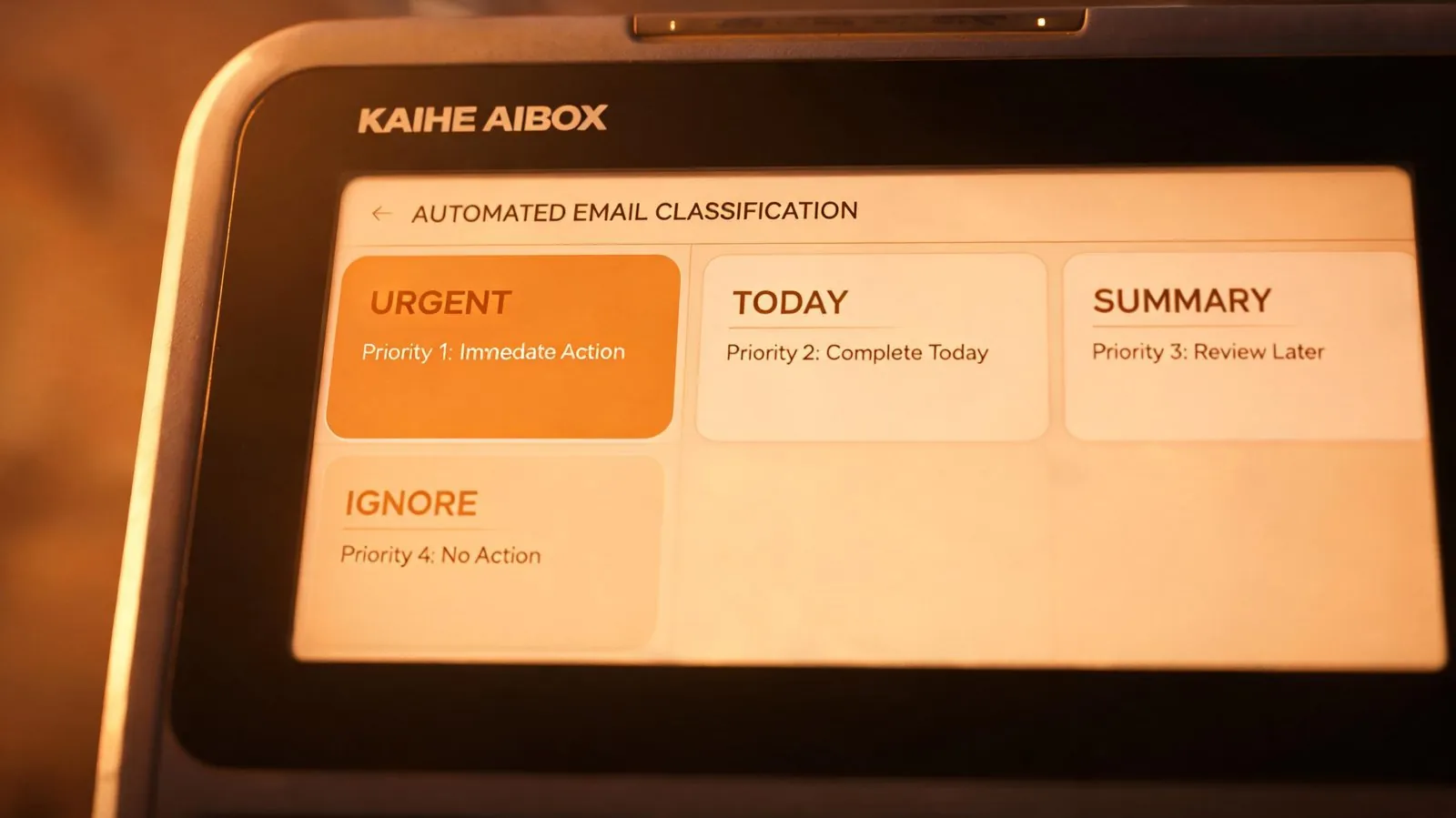
I have a KAIHE AIBOX on my desk—a dedicated agent computer that runs 24/7 independently. I set a scheduled task: check email every 2 hours, automatically doing four things:
1. Fetch and classify by priority. It reads sender, subject, and body keywords, sorting emails into four tiers: "Urgent Reply," "Handle Today," "Weekly Summary," and "Ignorable." I set the rules—client contracts are urgent, internal reports go to summary, marketing emails are ignored.
2. Generate summaries and push to my messaging app. After each check, it sends a brief message to my Feishu: 3 unread, 1 urgent (client contract revision), 2 for today. I scan it and know the picture without opening each one.
3. Draft reply emails. For emails that need responses, it drafts replies based on my historical reply style and the email content, placing them in the drafts folder. When I get to the office, I just review and edit—cutting my reply time to a third.
4. Flag emails for follow-up. Some emails don't need an immediate reply but need tracking (e.g., waiting for client feedback after a quote). It sets a calendar reminder, and if there's no response after three days, it prompts me to send a follow-up.
The Key Point: Your Computer Doesn't Need to Be On
This is the biggest difference between KAIHE AIBOX and every cloud-based AI tool.
You may have used various email assistants—Gmail's Smart Reply, Outlook's AI drafting, third-party email management apps. They all share one prerequisite: your computer or phone must be on, you must be logged in, and you must be operating inside that app.
KAIHE AIBOX is different. It is a standalone agent computer with its own processor, its own network connection, and its own storage. After you set the scheduled task, you can shut down your laptop, unplug your monitor, and walk out of the office—it's still running.
At 10 PM, when you're watching TV at home, it's at your office desk collecting email. At 3 AM, while you sleep, an overseas client sends an urgent email—it's classified and flagged instantly, a reply draft is generated, and by the time you open your inbox the next morning, everything is ready.
This isn't "AI helps you write email." This is "AI takes your email shift for you."
Comparison: Traditional vs. KAIHE AIBOX
| Traditional Email | KAIHE AIBOX Scheduled | |
|---|---|---|
| Your computer | Must be on | Not needed |
| Check frequency | Whenever you feel like it, easy to miss | Every 2 hours, on time |
| Late night / cross-timezone | Sleeping = missed | 24/7, never closes |
| Classification | Manual, one by one | AI auto-sorts into 4 tiers |
| Reply drafts | Write from scratch | Already drafted for you |
| Cost | Cloud AI charges per token | One-time purchase, no subscription |

Start with One: Email First, Then Expand
If you haven't used KAIHE AIBOX's scheduled tasks yet, start with email. Setup is simple: tell it your email account, check frequency (every 2 hours recommended), classification rules, and push channel (WeChat/Feishu/DingTalk), and it gets to work.
Once you're used to "not having to watch your inbox," expand gradually: have it summarize industry news every 4 hours, compile a daily to-do list at 8 AM every morning, and auto-generate a weekly report draft every Friday afternoon. One KAIHE AIBOX can run multiple independent scheduled tasks simultaneously without interference.
The key is—all these tasks run locally on your KAIHE AIBOX. Email content, reply drafts, and work files all stay on this agent computer. Nothing is uploaded to the cloud or routed through third-party servers.
Email processing shouldn't eat your best work hours. Let KAIHE AIBOX take those shifts—you only do the final step: review, edit, send.
Further Reading: - 5 Things AI Can Do While You Sleep: Scheduled Tasks Are AI's Most Underrated Capability - First Thing After Getting KAIHE AIBOX: Set Up a Scheduled Agent in 5 Minutes - Spend 5 Minutes a Day: Let AI Handle Your Email, Reports, and Scheduled Summaries
KAIHE AIBOX #Local AI #Scheduled Tasks #AI Office #Email Automation #Personal AI Assistant
For more information, search [KAIHE AIBOX] or contact: [email protected]
KAIHE AIBOX · 7x24 Personal AI Assistant | User Stories