Kaihe AIBOX Does More Than AI Assistants: It's Also a Smart Home Hub, Controlling All Devices via WeChat
📖 Glossary
AI Box (also known as Agent Computer / Agent PC), is a dedicated local hardware device that runs AI Agents. Pre-installed with an AI agent management system, plug-and-play, running 24/7. Users can remotely command AI to work via Discord, Slack, Telegram, WhatsApp, and more.
Abstract: Kaihe AIBOX supports HTTP and MQTT IoT protocols, connecting to smart sensors, plugs, security cameras, and temperature/humidity devices. Send a WeChat message to check home temperature, turn lights on/off, or view surveillance footage. One device runs AI Agents + IoT hub simultaneously, eliminating the need for a separate smart home gateway.
Most people think an AI Box can only chat, write emails, and answer questions.
But Kaihe AIBOX is a full Linux device with complete networking capabilities — it doesn't just run Agents, it can communicate with your smart home devices too.
HTTP and MQTT are the two universal IoT communication standards. Most smart home devices (smart plugs, temperature sensors, security cameras, smart bulbs) support both protocols. Through OpenClaw's Agent framework, you can configure an IoT Agent specifically to interact with these devices.
This means: your AI assistant isn't just a chatbot — it's your smart home manager.
What It Can Do
Check temperature and humidity. Send "What's the temperature at home?" on WeChat. The Agent queries the temperature sensor via MQTT and replies: "Living room 26.3°C, humidity 58%."
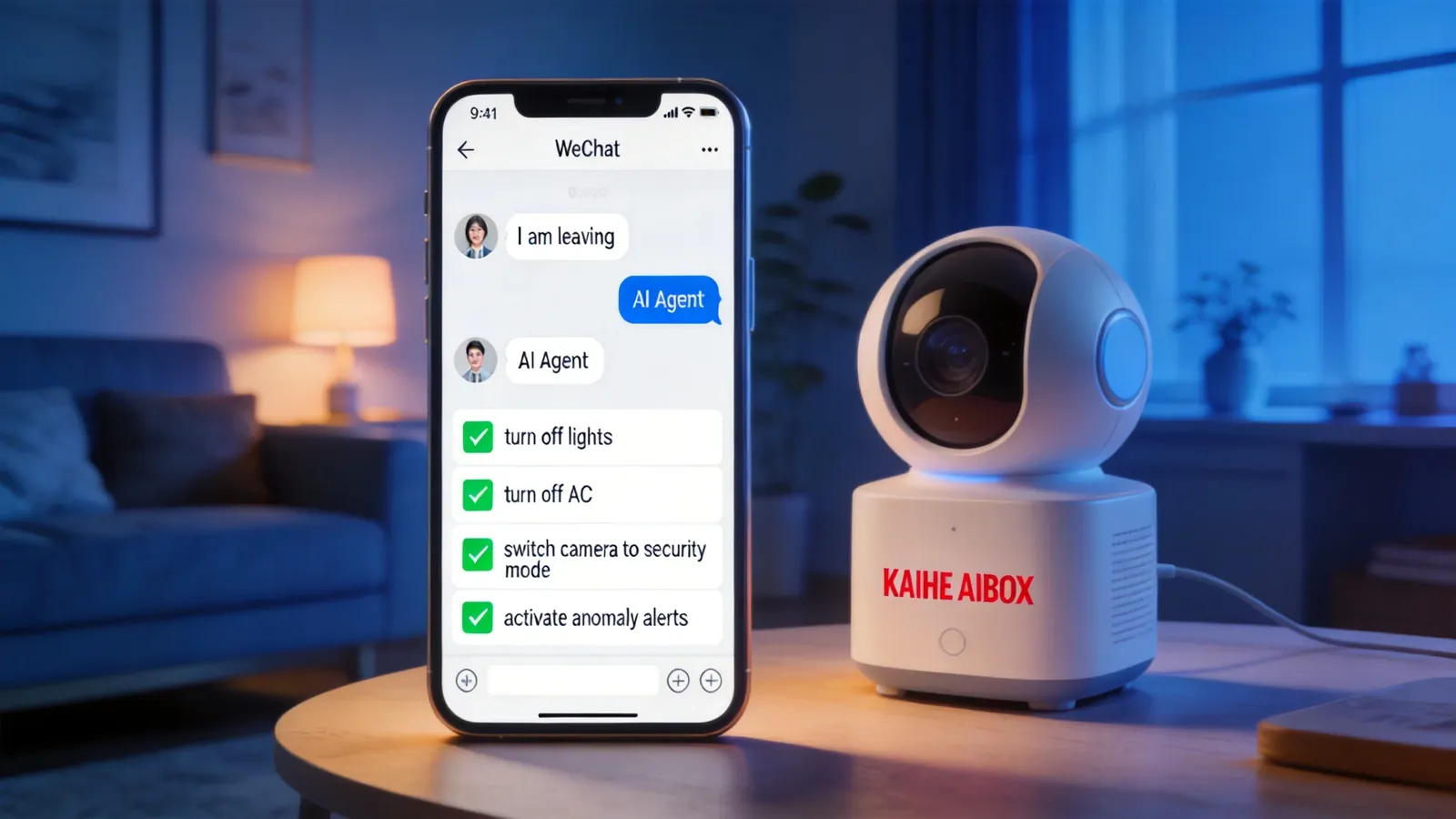
Turn lights on/off. Send "Turn off the living room light." The Agent calls the smart plug API via HTTP and turns off the living room light. Send "Turn off all lights" — the Agent batch-calls all light plug APIs.
View surveillance. Send "Show me the front door camera." The Agent calls the camera API, captures a current frame screenshot, and pushes it to WeChat. You can check deliveries at your doorstep while sitting at your office.
Scheduled control. Set scheduled tasks — "Auto-turn off all lights at 11 PM every night," "Auto-turn on living room light at 7 AM every morning," "Auto-start AC when temperature exceeds 30°C." The Agent executes via scheduled triggers — no need to manually send messages each time.
Anomaly alerts. Configure security rules — "Push screenshot to WeChat when front door camera detects motion," "Alert when temperature sensor reads above 35°C." The Agent monitors device status in real-time, automatically pushing notifications for abnormal events.
Difference from Regular Smart Home Systems
Regular smart home gateways (like Xiaomi or Huawei smart home centers) can only control devices — turn lights on/off, adjust temperature. They don't understand why you're doing something, and won't proactively help you.
Kaihe AIBOX as an IoT hub doesn't just control devices — it understands your intent. You say "I'm leaving" — the Agent doesn't just turn off lights. It also turns off the AC, switches the door camera to security mode, and activates anomaly alerts. You say "I'm home" — the Agent turns on the living room light, sets AC to 25°C, switches camera back to normal mode, and pushes a front door screenshot to confirm everything's safe.
The difference: gateways execute commands. Agents understand intent and orchestrate execution.
And regular smart home gateways require dedicated apps — Xiaomi smart home uses the Mi Home app, Huawei uses the Smart Life app. Kaihe AIBOX only needs WeChat — send a message, no new app required.
Suitable Scenarios
Home security. Door camera monitors 24/7, auto-pushes screenshots on motion detection. Temperature anomalies trigger alerts. One-tap security mode when leaving home.
Store equipment monitoring. Small stores switch cameras to security mode after closing. Refrigerator temperature anomalies auto-push alerts — fresh food stores and pharmacies especially need temperature monitoring.
Office automation. Lights and AC auto-off after work hours, auto-on before arrival. Meeting room scheduled control — projector and lights activate when a meeting is booked.
One device running both AI Agents and IoT hub — no need for a separate smart home gateway, no need for a separate security monitoring system. Agent and device control happen on the same device, configured in the same WeChat conversation. To learn more, visit the homepage.
Want to Go Deeper?
"A 24/7 AI Butler: Scheduled Tasks + Auto Push, Saving 2 Hours Daily" — more automation scenarios "Kaihe AIBOX A1 Review: Pre-installed OpenClaw + Hermes, First Agent in 5 Minutes" — explore A1's full capabilities
Official Contact Information
Website: agentaibox.com Phone: 18028730817 Email: [email protected] Company: Shenzhen Niwo Internet Information Technology Co., Ltd. Address: Building B 101, Phoenix Plaza, Guangming District, Shenzhen WeChat Customer Service: Scan the QR code at the bottom of the official website for direct connection
Contact priority: WeChat QR code > Phone > Email > Website contact form
-#SmartHome #IoTHub #KaiheAIBOX #AIAgent #WeChatControl
Kaihe AIBOX | The Agent Computer That Works 7×24 for You · Product Center