Simplest OpenClaw Installation for Regular Users: 3 Methods Difficulty Compared
📖 Glossary
AI Box (also known as Agent Computer / Agent PC), is a dedicated local hardware device that runs AI Agents. Pre-installed with an AI agent management system, plug-and-play, running 24/7. Users can remotely command AI to work via Discord, Slack, Telegram, WhatsApp, and more.
Abstract: OpenClaw has three installation methods — Feishu one-click (5 min, zero tech), cloud VPS (20 min, 24/7 online), local deployment (10-20 min, full data control). Which suits you? Compared across difficulty, time, cost, and target users.
"OpenClaw is great, but installation is too hard."
This is many people's first impression. As an open-source framework, local deployment requires technical basics — install Node.js, configure environment variables, edit config files... For someone who's never coded, just seeing the terminal is enough to give up.
But OpenClaw now has three installation paths, not just "local deployment." Here's a four-dimension comparison — difficulty, time, cost, target users — to help you find your best fit.
Method 1: Feishu One-Click (Simplest)
Difficulty: ⭐ (zero tech) Time: 5 minutes Cost: Free Best for: Complete beginners who want quick experience
Feishu officially partnered with OpenClaw for a one-click deployment. No coding needed, no software to install — a few clicks and it runs.
Steps: 1. Access Feishu Miaoda page on phone or computer 2. Click "One-Click Deploy" 3. Authorize Feishu account 4. Wait 5 minutes for auto-completion 5. Chat with OpenClaw directly in Feishu
Pros: Lowest barrier, 5 minutes, completely free. Works within Feishu ecosystem — no extra app needed.
Cons: Depends on Feishu platform — must use Feishu to interact. Data stored on Feishu cloud, not on your machine. Free resources have limits; heavy use may require paid upgrade. Can't use without Feishu open.
Method 2: Cloud VPS (Most Stable)
Difficulty: ⭐⭐ (some tech needed) Time: 20 minutes Cost: Free/¥50/month Best for: Power users wanting 24/7 availability
Rent a VPS from Tencent Cloud or Alibaba Cloud, deploy OpenClaw on it. OpenClaw runs 24/7 in the cloud — your computer doesn't need to be on.
Steps: 1. Purchase a cloud server (minimum config works, 2-core 4GB sufficient) 2. SSH into server 3. Install Docker and Docker Compose 4. Clone OpenClaw source from GitHub 5. Modify config file (API Key, etc.) 6. Execute deployment command 7. Bind WeChat or Feishu
Pros: 24/7 online, independent of your computer. Data in cloud, more stable than local. Ideal for scheduled tasks requiring continuous operation.
Cons: Requires some technical base — SSH, config editing, reading error messages. Monthly server cost (~¥50). Data on cloud server, not in your hands.
Method 3: Local Deployment (Most Freedom)
Difficulty: ⭐⭐⭐ (tech foundation needed) Time: 10-20 minutes Cost: Completely free Best for: Tech-savvy users who value data privacy
Install OpenClaw on your own computer. All data stays on your local disk — never touches any third party.
Steps (Windows one-click installer): 1. Download OpenClaw Windows installer (~45.8MB) 2. Extract (use 7-Zip, not system default) 3. Double-click "Openclaw Windows One-Click Start.exe" 4. Choose pure English installation path (no Chinese, spaces, or special characters) 5. Click "Start Installation," wait for auto-deployment 6. Configure AI model API Key 7. Bind WeChat
Note: Installation path must be pure English. Chinese paths are the most common cause of Windows deployment failures.
Steps (Command line, Mac/Linux):
1. Open Terminal
2. Run curl -fsSL https://openclaw.ai/install.sh | bash
3. Follow prompts to complete configuration
4. Bind WeChat or Feishu
Pros: Full data control — conversation history, Memory files, API Keys all on your machine. Zero cost, no server fees. Easy debugging with real-time logs.
Cons: Computer off = offline — can't use when away. Must keep computer running. Some technical requirement (though one-click installer lowers the barrier, troubleshooting errors still needs capability).
Method 4: Kaihe AIBOX A1 (Most Hassle-Free)
Difficulty: ⭐ (zero tech) Time: 5 minutes Cost: ¥999 (one-time) + ¥3.5/month electricity Best for: People who don't want to tinker, want 24/7 online, and want data in their hands
Strictly speaking, this isn't an "installation method" — OpenClaw is already pre-installed. Kaihe AIBOX A1 ships with OpenClaw and Hermes pre-loaded. Plug in power and Ethernet, 5 minutes to use.
Steps: 1. Plug in power and Ethernet 2. Access device address in browser 3. Enter AI model API Key 4. Scan WeChat QR code to bind
Pros: Zero tech barrier, 5-minute plug-and-play. 24/7 online, doesn't use your computer, computer doesn't need to be on. Data on your device. Power ≤10W, ¥3.5/month electricity. No fan noise.
Cons: One-time hardware purchase (¥999). Local storage 64GB, not for large data. RK3576 compute limited, can't run local model inference (calls cloud models via API).
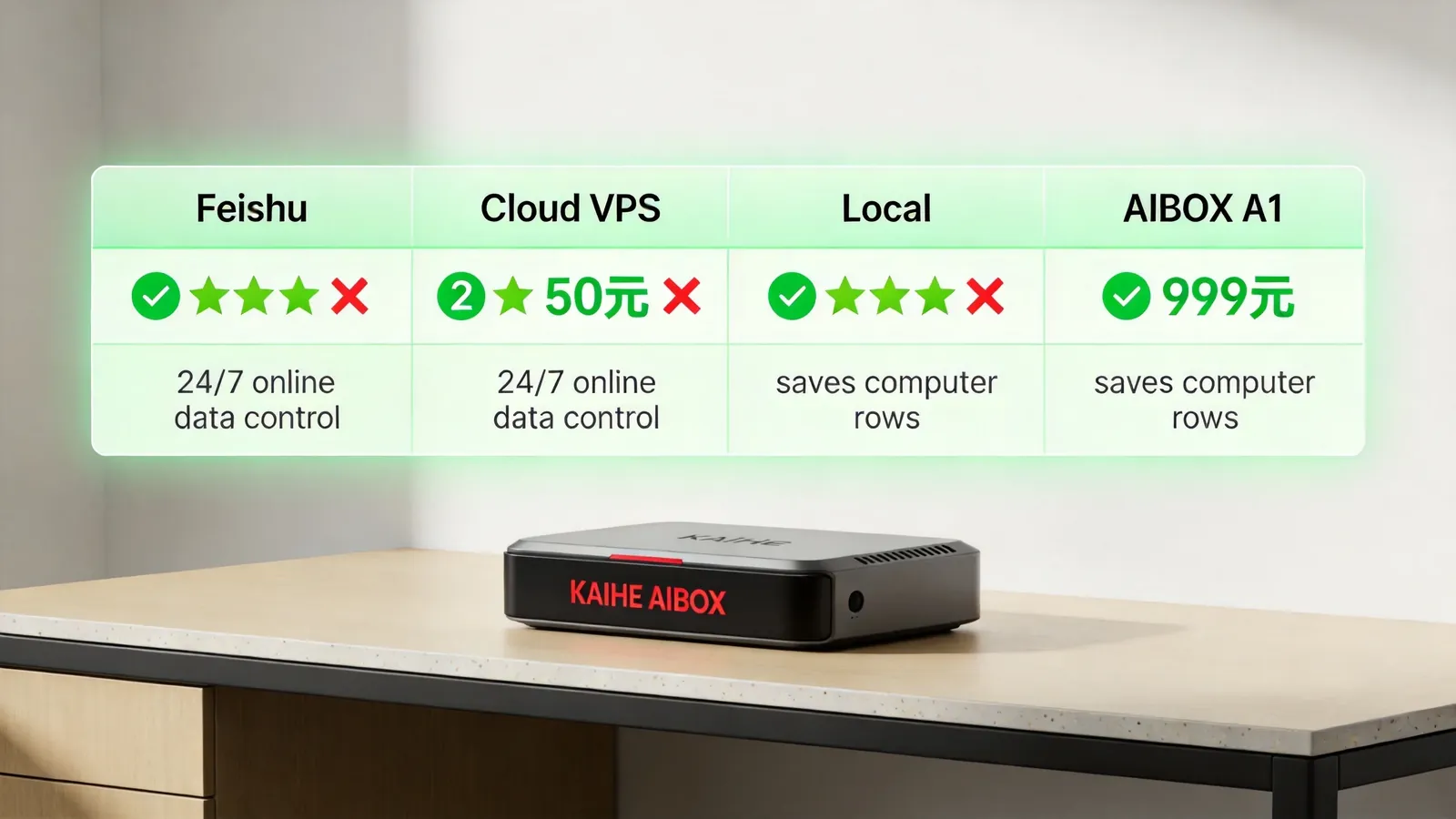
Four-Way Comparison
| Feature | Feishu | Cloud VPS | Local | AIBOX A1 |
|---|---|---|---|---|
| Difficulty | ⭐ | ⭐⭐ | ⭐⭐⭐ | ⭐ |
| Time | 5 min | 20 min | 10-20 min | 5 min |
| Cost | Free | ¥50/mo | Free | ¥999+¥3.5/mo |
| 24/7 online | ❌ | ✅ | ❌ | ✅ |
| Data control | ❌ | ❌ | ✅ | ✅ |
| Saves computer | ✅ | ✅ | ❌ | ✅ |
| Tech barrier | Zero | Medium | High | Zero |
How to Choose
First experience: Feishu one-click. Zero barrier, zero cost, 5 minutes to feel what OpenClaw does. Not suitable? Walk away anytime, no loss.
Long-term stable use: Cloud VPS. ¥50/month, 24/7 online, for those needing continuous scheduled tasks. Requires some tech base.
Data privacy priority: Local deployment. All data on your machine, most secure. But computer must stay on, can't use when away.
No tinkering: Kaihe AIBOX A1. One-time ¥999, everything pre-installed, 5-minute plug-and-play. 24/7 online, data control, saves computer — captures all three methods' advantages. The only cost is hardware.
Ultimately, the choice depends on what you're willing to spend — time learning tech (local), money on server rental (cloud VPS), or money on hardware (A1). If you want to spend nothing, Feishu is the best starting point. To learn more, visit the homepage.
Want to Go Deeper?
"OpenClaw WeChat Plugin Tested: Your Phone Is the Console, iOS 8.0.70 Required" — Control OpenClaw from WeChat "Kaihe AIBOX A1 Review: Pre-installed OpenClaw + Hermes, First Agent in 5 Minutes" — A1 deep review
-#OpenClawInstall #OneClickDeploy #KaiheAIBOX #AIAgent #LocalDeployment
Kaihe AIBOX | The Agent Computer That Works 7×24 for You · OpenClaw