OpenClaw WeChat Plugin Tested: Your Phone Is the Console, iOS WeChat 8.0.70 Required
📖 Glossary
AI Box (also known as Agent Computer / Agent PC), is a dedicated local hardware device that runs AI Agents. Pre-installed with an AI agent management system, plug-and-play, running 24/7. Users can remotely command AI to work via Discord, Slack, Telegram, WhatsApp, and more.
Abstract: WeChat officially launched the OpenClaw plugin "WeChat ClawBot," available on iOS WeChat 8.0.70+. Your phone can directly control OpenClaw on your computer — send files, search, write code, operate your PC. Phone becomes AI console. 3-minute setup.
Previously, OpenClaw could only be accessed through a computer browser management interface or via WeCom bot interactions. For personal WeChat users, there was always a layer in between.
Now that's solved.
WeChat officially introduced a plugin called "WeChat ClawBot" in iOS WeChat version 8.0.70. After installation, your phone's WeChat can directly control OpenClaw running on your computer — you send messages on your phone, the computer receives and executes commands, results come back via WeChat.
No extra app, no browser, no complex network configuration. Your phone is the OpenClaw console.
Before Installation
Compatible version: iOS WeChat 8.0.70+ (Android rolling out in phases). Update via App Store if not current.
You need a computer with OpenClaw installed — desktop or laptop, Linux/Mac/Windows all work. If not installed, use the OpenClaw deployment assistant for one-click setup.
You also need an AI model configured (like DeepSeek, Doubao, GPT, etc.) since ClawBot needs a "brain" to process your commands.
3-Step Installation
Step 1: Open WeChat Plugin. Follow the path: - Open WeChat → bottom right "Me" → "Settings" → "Plugins" - Find "WeChat ClawBot" in the plugin list - Click "Connect"
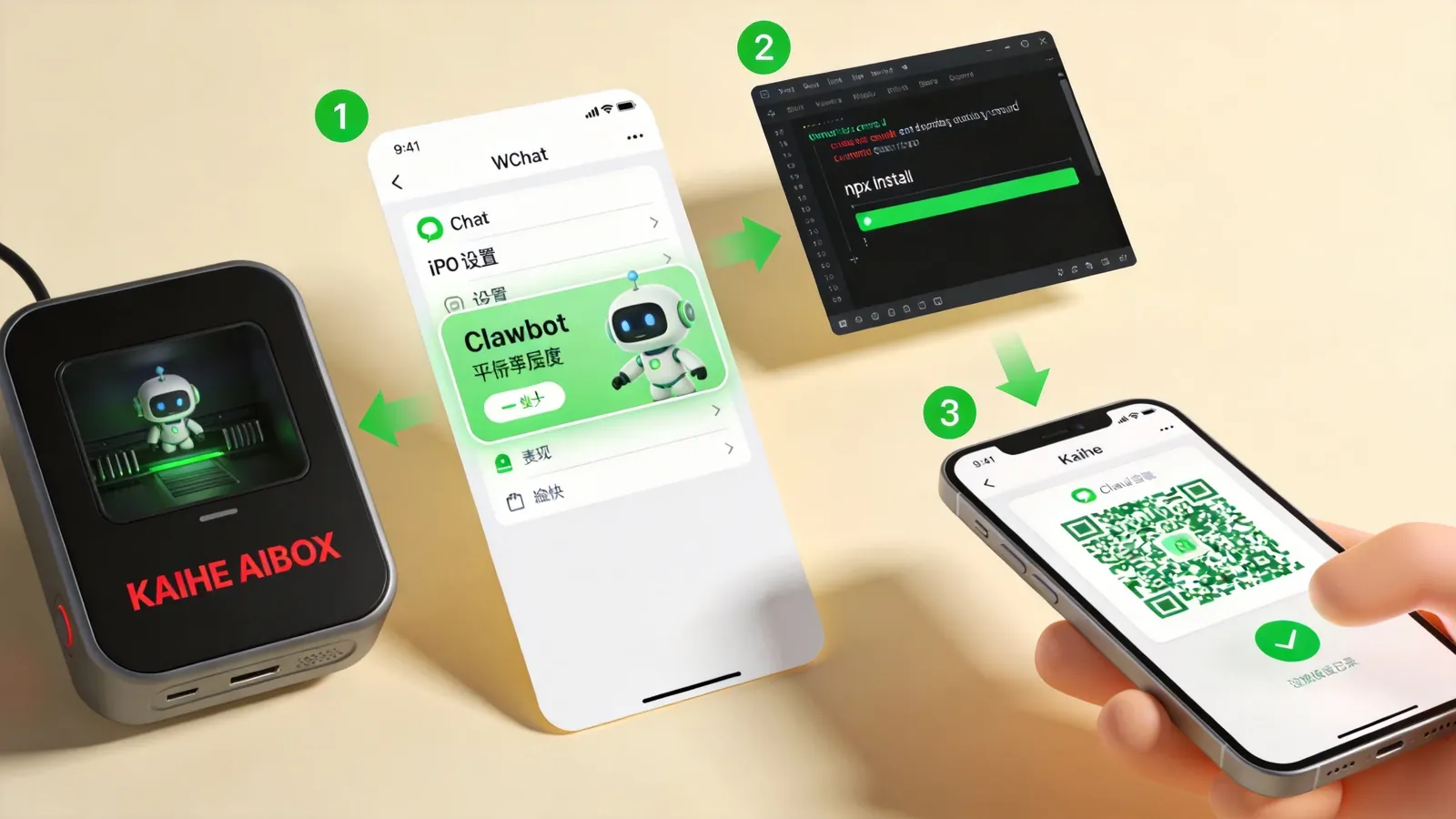
The plugin entry looks like: a lobster icon, named "WeChat ClawBot."
Step 2: Computer-side Installation. Open your computer's terminal (Mac: "Terminal," Windows: "Command Prompt"), enter:
npx -y @tencent-weixin/openclaw-weixin-cli@latest install
Press Enter. Auto-installation takes about 30 seconds.
Note (Windows users): npx occasionally has issues on Windows. If you see "npx not recognized," install Node.js first, or use alternative installation methods per official docs.
Step 3: Scan to Bind. After successful installation, the terminal auto-generates a QR code. Scan with WeChat — confirm authorization.
Return to WeChat, find "WeChat ClawBot" in your chat list (a conversation with a lobster avatar).
From opening the plugin to successful binding: about 3 minutes.
What It Can Do
After binding, you can send messages directly in the WeChat ClawBot chat, just like chatting with a friend.
Send an Excel file with "Help me organize this data" — ClawBot reads, processes, and sends back the cleaned data.
Or "Write a Python script to merge all markdown files in the current directory into one PDF" — ClawBot executes on your computer and sends the PDF to your phone.
Even "Check my email every morning at 9 AM and push new messages to WeChat" — ClawBot sets up a scheduled task on your computer, running automatically every morning.
Most practical scenarios:
File Processing. Receive files in WeChat, let ClawBot process them (convert formats, extract content, clean data), get results back on phone.
Remote Execution. You're out, computer is on — tell ClawBot to execute commands: search, run scripts, generate reports.
Information Retrieval. Ask ClawBot to find information on websites — "Find this week's industry news" — ClawBot opens a browser, searches, and summarizes results.
Scheduled Tasks. Set a task in WeChat — "Push today's to-do list at 8 AM daily" — ClawBot runs it on schedule.
Working with Kaihe AIBOX A1
If you have a Kaihe AIBOX A1, it's even better.
A1 runs 24/7 with OpenClaw and Hermes pre-installed. Open WeChat ClawBot on your phone and send commands to A1 anytime — no computer needed.
A1 uses minimal power (peak 10W, ~¥3.5/month electricity), doesn't use your computer's resources, doesn't require your computer to be on. ClawBot + A1 = a small black box at home or office that you control from anywhere via phone.
Without A1, you can still install OpenClaw on your own computer — WeChat ClawBot works the same. But the computer can't be turned off.
A Real Use Case
A user shared on CSDN: using OpenClaw ClawBot to remotely operate a work computer for data retrieval and file sending.
OpenClaw installed on the work computer, bound via WeChat ClawBot. After hours at home, suddenly needed data for next day's report — data was on the work computer. Sent a WeChat message to ClawBot: "Find Q2 sales data.xlsx on the desktop, summarize by product category using Python, generate a bar chart, send it to me."
ClawBot executed three steps on the work computer: locate file, process data with Python, generate chart. Minutes later, the chart arrived on the phone.
No remote desktop, no VPN, no TeamViewer. Just one WeChat message.
Security Notes
Phone controlling computer means high access level. Three recommendations:
Don't grant group chat access. ClawBot defaults to personal chat only. Don't add it to groups where everyone could command your computer.
Don't leave computer unattended. An authorized computer can be de-authorized by anyone with physical access.
Check authorization regularly. View authorized devices and status in the WeChat plugin settings page to ensure only your phone is connected.
Conclusion
WeChat ClawBot lowers OpenClaw's usage barrier another notch. What previously required a computer now needs just one WeChat message.
"Phone pings, home AI Agent starts working" — from working on a computer, to directing a computer from your phone. To learn more, visit the homepage.
Want to Go Deeper?
"Hermes Agent Office Automation: One Message, Excel Analysis + PDF Auto-Generated" — more Agent scenarios "Kaihe AIBOX Setup Guide: 4 Steps, 5 Minutes from Power-On to WeChat" — A1 installation
-#OpenClaw #WeChatClawBot #KaiheAIBOX #AIAgent #WeChatPlugin
Kaihe AIBOX | The Agent Computer That Works 7×24 for You · OpenClaw