Summary: On July 30, WorkBuddy V5.3.5, in partnership with Tencent Docs, officially launched "Human-AI Co-Writing," fundamentally transforming how people interact with AI in office work. Previously, using AI to edit documents required at least seven steps with constant window switching breaking your train of thought. Now you simply select content directly in Word, Excel, PowerPoint, or Markdown, click "AI Edit," state your request, and AI makes the changes in place—polishing text, calculating data, generating charts, beautifying slides, responding to comments, all with zero window switches and zero copy-paste.

The Copy-Paste Problem Plaguing AI Office Work
📖 Glossary
AI Box (also known as Agent Computer / Agent PC), is a dedicated local hardware device that runs AI Agents. Pre-installed with an AI agent management system, plug-and-play, running 24/7. Users can remotely command AI to work via Discord, Slack, Telegram, WhatsApp, and more.
Over the past two years, AI large language models have penetrated office work faster than anyone expected. Almost everyone now uses AI to draft proposals, build spreadsheets, and refine presentations. But nearly every user shares a common frustration: AI lives in one window, your document lives in another, with countless copy-paste operations standing between them.
You have undoubtedly experienced these scenarios:
- Polishing report text: Select a paragraph, Ctrl+C, switch to a browser to open ChatGPT, Ctrl+V, type "help me condense this to 200 words," wait for the response, Ctrl+C the result, switch back to Word, find the original position, Ctrl+V. That is seven steps round-trip. Make ten edits and you repeat those steps seventy times.
- Working with Excel data: Copy data into the AI chat, ask AI to calculate growth rates or group statistics, manually type results back into Excel cells, then manually select data ranges and insert charts. One wrong range selection and you start over.
- Beautifying presentations: Paste text outlines to AI for design suggestions, then manually adjust font sizes, color schemes, and layouts page by page. A gap always exists between what AI suggests and what actually lands on the slide.
- Responding to comments: Your boss leaves ten comments in a document. You read them one by one, edit one by one, verify nothing is missed—an incredibly inefficient process.
These operations seem trivial, but over a day, the time spent switching windows and copying-pasting can consume over 30% of working hours. More critically, frequent window switching severely disrupts flow of thought.
The real bottleneck has never been whether AI is smart enough—it is that the interaction between humans and AI is too clumsy.

What Is Human-AI Co-Writing: AI Works Directly in Your Documents
The core concept is simple: AI is no longer an external tool you must seek out, but an embedded collaboration partner always ready inside your documents. Think of it as a senior colleague sitting right next to you—you point to something, they fix it, and the result appears before your eyes.
Core Interaction Model
- Select-and-Edit: In Word/Excel/PPT/Markdown, select any text, data set, or page element, right-click or click "AI Edit" on the toolbar, and type your request. AI makes the edit directly in place.
- Comment-Driven Edits: AI automatically recognizes document comments. Ask AI to modify paragraphs based on comment content, and AI locates, replaces, and updates automatically.
- Multi-Person + AI Three-Way Collaboration: You, a colleague, and AI can work in the same document simultaneously. Everyone's changes are visible in real-time—no more sending files back and forth.
Supported File Types and Platforms
| File Type | Supported Operations |
|---|---|
| Word / Online Docs | Text polishing, condensing, translation, format adjustment, typo correction, comment-based edits |
| Excel / Online Sheets | Data calculation, grouped statistics, formula generation, chart insertion, data cleaning, conditional formatting |
| PPT / Online Slides | Page beautification, color adjustment, text layout, animation addition, content completion |
| Markdown | Format adjustment, content polishing, code block generation, auto TOC |
Platform support covers Tencent Online Docs and local Office files across Windows, Mac, and HarmonyOS.
Four High-Frequency Scenarios: How Much Does Efficiency Improve?
Scenario 1: Long-Form Report Polishing—From 7 Steps to 1
Traditional approach: ~45 seconds per paragraph; ten edits take 7-8 minutes. Human-AI Co-Writing: ~10 seconds per paragraph; ten edits in under 2 minutes. You never leave the document interface, maintaining seamless creative flow.
Scenario 2: Excel Data Processing + Charts—AI Turns Thinking Into Doing
Traditional approach: Manual filtering, formula writing, chart insertion takes 5-8 minutes even for skilled users. Human-AI Co-Writing: Select data range, tell AI what to do, and charts appear in place in about 30 seconds.
Scenario 3: One-Click PPT Beautification
Human-AI Co-Writing: Select a page, describe your desired style, and AI adjusts directly. No manual element dragging required.
Scenario 4: Batch Comment Response
Traditional approach: Ten comments take 20 minutes to process. Human-AI Co-Writing: Click "Process All Comments," AI handles everything, you do a final review. Processing time drops to under 3 minutes.
The Technology Behind Human-AI Co-Writing
"AI editing content directly in documents" requires solving three core technical challenges:
First, precise positioning. AI must accurately understand selection scope and contextual relationships. WorkBuddy uses document structured parsing to establish precise mapping between the AI model and the document.
Second, format preservation. Many AI tools destroy original formatting after editing. WorkBuddy's Human-AI Co-Writing fully preserves original formatting, changing only text without touching styles.
Third, multimodal collaboration. Generating charts requires understanding data structures, selecting chart types, matching color schemes, and correct placement. AI must handle natural language, tabular data, slide layouts, and Markdown conventions cross-modally.
Solving these transforms Human-AI Co-Writing from "usable" to "genuinely useful"—AI's output is the final usable version.
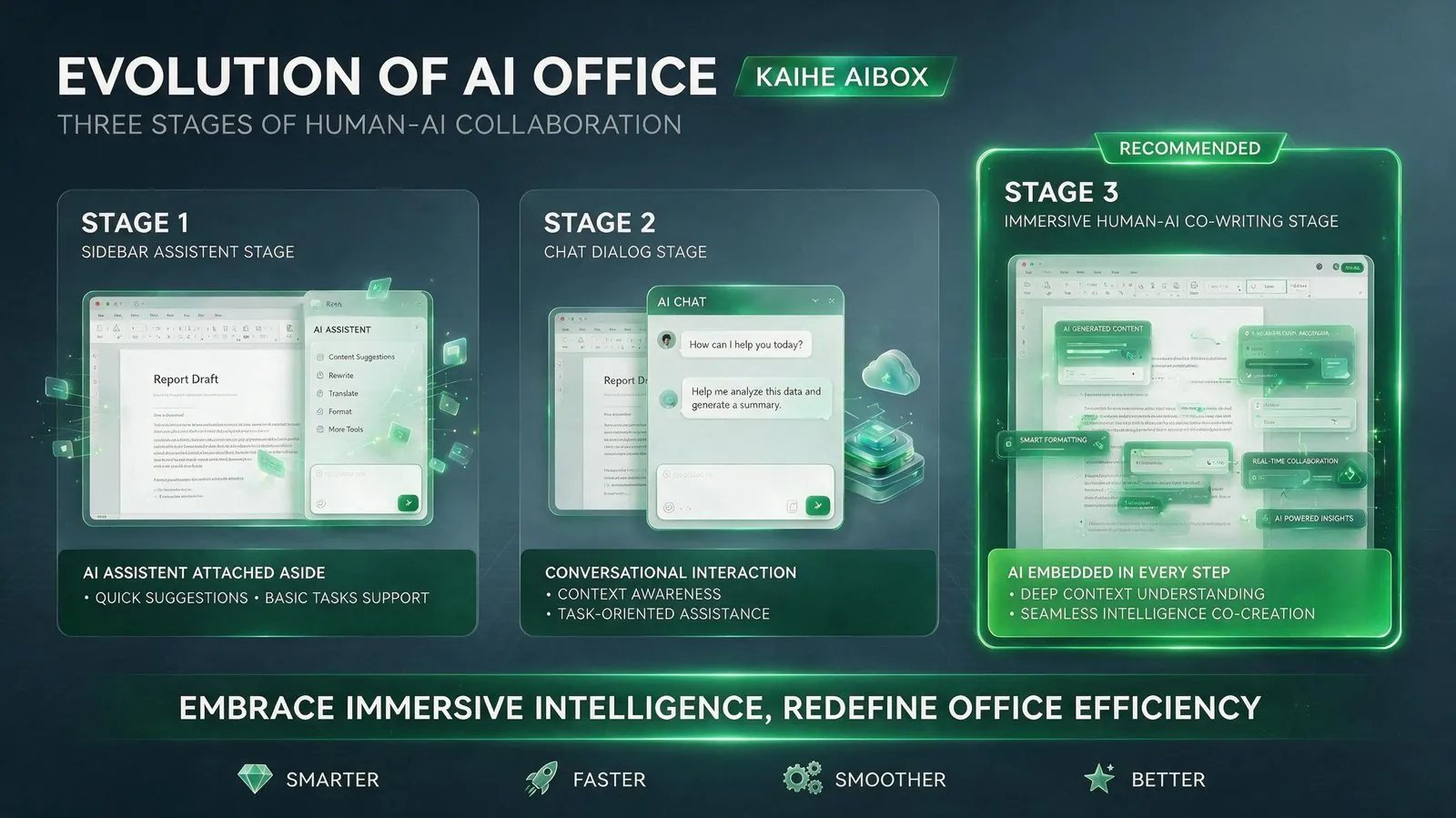
The Next Stage: From Conversational to Immersive AI
| Stage | Interaction | Typical Products | Core Pain Point |
|---|---|---|---|
| Stage 1 | Sidebar assistant | Copilot plugins | Manual copy-paste to sidebar |
| Stage 2 | Chat dialog | ChatGPT, etc. | Separate windows, constant switching |
| Stage 3 | Immersive Co-Writing | WorkBuddy V5.3.5 | AI embedded, select-to-edit, in-place modification |
Human-AI Co-Writing represents an important direction: AI tools should disappear into the workflow, not become an additional interface. Just as GUIs replaced command lines, the best interaction makes you forget you are using a tool.
KAIHE AIBOX is committed to building AI assistant experiences that truly integrate into workflows. WorkBuddy Human-AI Co-Writing is an important step in that direction.
Further Reading: - From Command Lines to Natural Language: How AI Is Reshaping HCI - Local AI vs. Cloud AI: Data Privacy in Office Scenarios - Three Practical Tips for 50% AI Office Productivity Gains
KAIHEAIBOX #WorkBuddy #AIOffice #HumanAICoWriting #TencentDocs #ProductivityTools
For more information, search [KAIHE AIBOX] or contact: [email protected]
KAIHE AIBOX · 7x24 Personal AI Assistant | AI Agents